
The best digital alarm clock with USB ports overall in this roundup is the Sharp model with USB-C and USB-A charging, dual alarms, and a red LED display, offering a useful mix of current and legacy connections. For more bedside power, the JACKYLED adds four USB charging ports and three outlets, while the XBA stands out with 20W USB-C charging and two AC outlets. The main tradeoff is whether you want a simple clock with a charging port or a compact power hub that takes up more bedside space. Display color, dimming, alarm flexibility, and the kind of USB ports you need can matter as much as the port count. Read on for the full breakdown and a guide to choosing the right setup.

Get wellness gear delivered free with Prime
- Fast, free delivery on millions of items
- Prime Video, Amazon Music and more included
- Member-only deals all year
Key Takeaways
- Port variety beats port count for many buyers: the Sharp USB-C/USB-A model supports both newer and older cables, while JACKYLED offers more USB charging connections.
- Outlet access is a major differentiator: the Sharp clock with two outlets, USB charging, and surge protection and the XBA with two AC outlets can reduce the need for a separate bedside power strip.
- USB-C power is not the same across models. The XBA specifies 20W USB-C, while several Sharp clocks describe 2A or fast charging; match the stated output to your devices rather than comparing port names alone.
- Display and alarm needs split the field. Red and green LED Sharp models focus on straightforward timekeeping, while the Cadmos adds an extra-loud alarm, RGB display, and night light for buyers who prioritize visibility and wake-up volume.
- More charging capacity can mean a larger bedside footprint. Multi-port power-strip clocks such as JACKYLED and Sussex suit device-heavy nightstands, while Peakeep‘s large-display, USB-charger design may better suit buyers who want a simpler clock.
| Sharp Alarm Clock with 2 Outlets, Fast USB Charging, and Surge Protection |  | Best for Bedside Power Protection | Model: SPC137 | Display: Digital, 0.7-inch screen | USB output: 2 amps | VIEW ON AMAZON | See Our Full Breakdown |
| Sharp Digital Alarm Clock with 2A USB Charging and Green LED Display |  | Best for Simple, Easy-to-Read Operation | Display: Green LED | USB charging: 2A high-speed port | Power: Corded electric with battery backup | VIEW ON AMAZON | See Our Full Breakdown |
| Sharp Digital Alarm Clock with USB 2 AMP Fast Charge Port & White LED Display |  | Best Compact Pick | Display: Digital white LED | USB output: 2 amps | Dimensions: 4.33 × 3.35 inches (W × H) | VIEW ON AMAZON | See Our Full Breakdown |
| JACKYLED Alarm Clock with 4 USB Chargers, Power Strip 3 Outlets, 1700J |  | Best for Charging Multiple Devices | USB ports: 4 | AC outlets: 3 | Surge protection: 1700J | VIEW ON AMAZON | See Our Full Breakdown |
| Sharp Digital Alarm Clock, USB-C & USB-A Charging, Dual Alarm, Red LED |  | Best for Mixed USB-C and USB-A Devices | Display: Red LED | USB ports: 1 USB-C and 1 USB-A | USB-A output: 2 amps | VIEW ON AMAZON | See Our Full Breakdown |
| Sussex Alarm Clock with 2 USB-C, 2 USB-A Chargers and 2 AC Outlets |  | Best for a Full Nightstand Charging Setup | USB-C ports: 2; one supports up to 20W PD | USB-A ports: 2, rated 5V/2.1A | AC outlets: 2 | VIEW ON AMAZON | See Our Full Breakdown |
| Sharp Digital Alarm Clock with 2A USB Charging and Red LED Display | 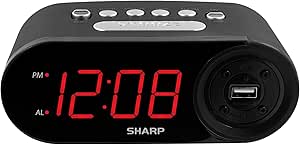 | Best for Straightforward, Easy-to-Read Operation | Display: Red LED digital | USB charging: 1 port, 2A | Alarm volume: Adjustable | VIEW ON AMAZON | See Our Full Breakdown |
| Sharp Digital Alarm Clock with Dual USB Fast-Charge Ports and Green LED Display |  | Best for Two USB Devices in a Compact Clock | Display: Green LED digital | USB ports: 2 fast-charge ports, 2A each | Alarm: Yes | VIEW ON AMAZON | See Our Full Breakdown |
| XBA Alarm Clock Charging Station, 20W USB-C, 2 AC Outlets |  | Best for Dual Alarms and Adjustable Display Control | USB ports: 4 total: 2 USB-C and 2 USB-A | USB-C fast charging: One 20W port | AC outlets: 2 | VIEW ON AMAZON | See Our Full Breakdown |
| Peakeep Digital Alarm Clock for Bedroom Bedside, Large Display, USB Charger |  | Best for Large Digits and a Stronger Wake-Up Alarm | Display: LED, 2-inch screen | Brightness: 5 levels | Alarm volume: 5 levels | VIEW ON AMAZON | See Our Full Breakdown |
| Cadmos Extra-Loud Digital Alarm Clock with RGB Display and Night Light |  | Best for Heavy Sleepers | Maximum alarm volume: 110 dB | Alarms: Dual | Display: 6.3-inch LED display with 2.17-inch-tall numbers | VIEW ON AMAZON | See Our Full Breakdown |
| digital alarm clock with usb port | Display | Dimensions | Backup batteries | Power |
|---|---|---|---|---|
| Sharp Alarm Clock with 2 Outle | Digital, 0.7-inch screen | 7.5 × 2.9 inches (W × H) | — | Corded electric with battery backup |
| Sharp Digital Alarm Clock with | Green LED | 6.2 × 2.3 inches (W × H) | 2 AAA, not included | Corded electric with battery backup |
| Sharp Digital Alarm Clock with | Digital white LED | 4.33 × 3.35 inches (W × H) | 2 AAA | — |
| JACKYLED Alarm Clock with 4 US | Dimmable full-screen LED | 13.46 × 4.57 inches (W × H) | 2 AAA, not included | — |
| Sharp Digital Alarm Clock | Red LED | 5.56 × 2.67 inches (W × H) | 2 AAA, not included | — |
| Sussex Alarm Clock with 2 USB- | Dimmable LED digital display | 5 × 4 × 2.5 in (listing); product details also state 2.4 in W × 2.8 in H | — | — |
| Sharp Digital Alarm Clock with | Red LED digital | 6.2 in W × 2.3 in H | 2 AAA, not included | Corded electric with backup for 2 AAA batteries |
| Sharp Digital Alarm Clock with | Green LED digital | 5.95 in W × 2.3 in H | 2 AAA, not included | Corded electric with battery backup |
| XBA Alarm Clock Charging Stati | 4 brightness levels, including off | — | 3 AA required; charging requires AC power | — |
| Peakeep Digital Alarm Clock fo | LED, 2-inch screen | 7 in W × 3.3 in H | 2 AAA, not included | Corded electric with AC/DC adapter |
| Cadmos Extra-Loud Digital Alar | 6.3-inch LED display with 2.17-inch-tall numbers | — | — | 5V/1A adapter and Type-C cable |
More Details on Our Top Picks
Sharp Alarm Clock with 2 Outlets, Fast USB Charging, and Surge Protection
I’d choose this Sharp when a bedside clock needs to do more than charge one phone. Its 2-amp USB port handles a device while the two AC outlets add room for other essentials, and built-in surge protection brings an extra layer of protection for connected electronics. That combination makes it more power-focused than the simpler Sharp Green LED model, which has a USB port but no listed AC outlets or surge protection. A three-level dimmer lets you reduce nighttime glare, while battery backup preserves timekeeping during an outage. The tradeoff is its small 0.7-inch display, which may be harder to read from across a bedroom; the Sharp White LED model is a better fit if at-a-glance visibility matters more. Backup batteries are also required and not included.
Pros:- Two AC outlets supplement the USB charging port
- 2-amp USB output supports faster charging than a basic 1-amp port
- Surge protection adds protection for connected electronics
- Three brightness levels and battery backup support bedside use
Cons:- The 0.7-inch display may be difficult to read from a distance
- Battery backup requires batteries that are not included
Best for: Nightstand users who need to charge a phone and plug in other small electronics while keeping surge protection close at hand.
Not ideal for: People who read the time from across a large bedroom, since its 0.7-inch display is small.
- Model:SPC137
- Display:Digital, 0.7-inch screen
- USB output:2 amps
- AC outlets:2
- Display dimmer:3 levels
- Power:Corded electric with battery backup
- Dimensions:7.5 × 2.9 inches (W × H)
- Color:Black
Our verdict“Choose this Sharp if outlets and surge protection matter more to you than having large, easily visible digits.”
Sharp Digital Alarm Clock with 2A USB Charging and Green LED Display
This Sharp is the straightforward choice in this group: green LED digits, simple controls, and a 2-amp USB port for charging a device from the nightstand. Its easy operation suits households where several people may need to set the alarm, including seniors or children. Compared with the Sharp USB-C & USB-A model, it gives up a second charging connection and dual alarms, but keeps the setup uncomplicated. The display is described as bright and readable across a room, a useful contrast with the smaller screen on the Sharp SPC137. One limitation matters during outages: the screen goes blank on battery backup, even though time and alarm settings are retained. That makes it less suitable for anyone who expects to see the time without mains power. Two AAA backup batteries are needed and are not included.
Pros:- 2-amp USB port supports high-speed device charging
- Simple controls suit users who prefer a basic alarm clock
- Bright green LED digits are designed to be visible across a room
- Battery backup retains time and alarm settings during an outage
Cons:- Display goes blank while operating on battery backup
- Two AAA backup batteries are not included
- Only one USB port is listed
Best for: People who want a no-fuss bedside alarm with visible green digits and one fast USB charging port.
Not ideal for: Buyers who need the clock face to stay lit during a power outage or want multiple device-charging ports.
- Display:Green LED
- USB charging:2A high-speed port
- Power:Corded electric with battery backup
- Backup batteries:2 AAA, not included
- Dimensions:6.2 × 2.3 inches (W × H)
- Weight:9.6 ounces
- Mounting:Tabletop
- Color:Black
Our verdict“Pick this model for uncomplicated controls and room-visible digits, provided a blank display during outages is acceptable.”
Sharp Digital Alarm Clock with USB 2 AMP Fast Charge Port & White LED Display
For a crowded bedside table, this Sharp stands out for its compact 4.33-inch width and single 2-amp USB charging port. The white LED digits are intended to be readable across a room, so the small body does not mean sacrificing a clear time display. Compared with the Sharp Green LED model, this is the more compact listed option, while both provide one fast USB connection and battery backup for settings. It is a better match for a narrow nightstand or desk than the JACKYLED power-strip clock, which adds several outlets and USB ports but takes up considerably more space. The tradeoff is limited charging capacity: there is just one USB port, and the screen goes blank during a power loss even when backup batteries retain the time and alarm settings. AAA batteries are not included.
Pros:- Compact 4.33-inch width fits smaller bedside surfaces
- 2-amp USB port supports fast charging for a connected device
- White LED display is designed for easy viewing across a room
- Battery backup retains time and alarm settings during outages
Cons:- Only one USB charging port is listed
- Display goes blank during power loss
- Two AAA backup batteries are required and not included
Best for: Apartment dwellers, students, or anyone with a narrow nightstand who wants one fast USB charging port and a compact clock.
Not ideal for: People charging several devices at once or anyone who needs the display to remain lit during a power outage.
- Display:Digital white LED
- USB output:2 amps
- Dimensions:4.33 × 3.35 inches (W × H)
- Weight:0.21 kg
- Mounting:Tabletop
- Material:ABS
- Backup batteries:2 AAA
- Usage:Indoor
Our verdict“Choose this Sharp when nightstand space is limited and one fast-charging connection is enough.”
JACKYLED Alarm Clock with 4 USB Chargers, Power Strip 3 Outlets, 1700J
The JACKYLED is the most capable bedside charging hub in this batch: four USB ports and three AC outlets can serve several devices without adding a separate power strip. Its 1700J surge protection, dimmable full-screen LED, and dual alarms make it a stronger choice for shared bedrooms or electronics-heavy nightstands than the single-port Sharp White LED clock. The added capacity comes with a footprint tradeoff: this unit is substantially wider than the compact Sharp options, and it must sit on a surface rather than mount elsewhere. Dual alarms help two people keep separate wake times, while the 9-minute snooze offers a familiar extra pause. Still, the listed screen size is 5.7 inches, so buyers expecting an especially large display may want to check their viewing needs. Backup requires two AAA batteries, which are not included.
Pros:- Four USB ports and three AC outlets provide multiple charging connections
- 1700J surge protection is built in
- Dual alarms support different wake times
- Dimmable LED display helps manage nighttime brightness
Cons:- Wide body needs more nightstand space than the Sharp compact models
- No mounting option is listed
- Two AAA backup batteries are required and not included
Best for: Couples or device-heavy households that need several USB connections, AC outlets, and separate alarm settings at one bedside station.
Not ideal for: People with a small nightstand or those seeking a wall-mountable clock with an especially large display.
- USB ports:4
- AC outlets:3
- Surge protection:1700J
- Alarms:2 independent alarms
- Snooze:9 minutes
- Display:Dimmable full-screen LED
- Dimensions:13.46 × 4.57 inches (W × H)
- Backup batteries:2 AAA, not included
Our verdict“Choose the JACKYLED if charging several devices and setting two alarms matter more than saving nightstand space.”
Sharp Digital Alarm Clock, USB-C & USB-A Charging, Dual Alarm, Red LED
This Sharp is the most flexible pick for bedside charging when your devices use different connectors. It pairs a USB-C port with a 2-amp USB-A port, avoiding the single-port limitation of the Sharp Green LED clock and the Sharp White LED clock. The dual alarms also suit couples or anyone who keeps different weekday and weekend wake times, while a three-step dimmer gives control over red LED brightness. Its 9-minute snooze and simple controls keep the clock focused on everyday use rather than the outlet-heavy role of the JACKYLED. A key caveat: the product description does not state the USB-C output, so I would not choose it on the assumption that this port delivers a particular fast-charging rate. Battery backup retains settings and allows the alarm to sound, but the display goes dark during an outage; backup batteries are not included.
Pros:- USB-C and USB-A ports accommodate different charging cables
- USB-A port provides 2-amp charging
- Dual alarms support separate wake schedules
- Three-step dimmer adjusts red LED brightness
Cons:- USB-C output rating is not specified in the supplied product details
- Display goes dark during battery backup
- Two AAA backup batteries are not included
Best for: People with a mix of USB-C and USB-A devices who also want two independent wake times on a bedside clock.
Not ideal for: Buyers who need multiple AC outlets or a confirmed USB-C charging speed, or who want the display illuminated during outages.
- Display:Red LED
- USB ports:1 USB-C and 1 USB-A
- USB-A output:2 amps
- Alarms:Dual alarm
- Snooze:9 minutes
- Dimmer:3 steps
- Dimensions:5.56 × 2.67 inches (W × H)
- Backup batteries:2 AAA, not included
Our verdict“Pick this Sharp for mixed USB-C and USB-A bedside charging plus dual alarms, but verify USB-C needs before buying.”
Sussex Alarm Clock with 2 USB-C, 2 USB-A Chargers and 2 AC Outlets
The Sussex is the strongest fit here when a bedside clock also needs to replace a small power strip. Its six charging connections include two AC outlets, two USB-A ports, and two USB-C ports; one USB-C port supports up to 20W PD charging for compatible devices. That gives it more outlet flexibility than the XBA Alarm Clock Charging Station, while both offer dual alarms and a dimmable display. The tradeoff is that the Sussex listing gives less detail about display brightness settings and snooze timing, so buyers seeking clearly specified controls may prefer the XBA. Its 6-foot cord and angled flat plug can help with awkward outlet placement, but backup batteries are not included, and its footprint is larger than a basic USB alarm clock.
Pros:- Six charging connections combine two AC outlets with four USB ports.
- One USB-C port supports up to 20W PD charging for compatible devices.
- Dual alarms, adjustable display brightness, and snooze add useful clock functions.
- Six-foot cord and 45-degree flat plug offer flexible placement.
Cons:- AAA backup batteries are not included.
- Clock settings can be retained on battery backup, but the display does not stay lit during an outage.
- The power-strip design takes more bedside space than the Sharp single-port clocks.
Best for: Bedside users who need AC outlets as well as USB charging for several devices and want a built-in dual-alarm clock.
Not ideal for: Minimalist nightstands or buyers who need a compact clock with clearly documented brightness and snooze controls.
- USB-C ports:2; one supports up to 20W PD
- USB-A ports:2, rated 5V/2.1A
- AC outlets:2
- Alarms:Dual alarm
- Display:Dimmable LED digital display
- Power cord:6 ft, 18 AWG, 45-degree flat plug
- Backup:2 AAA batteries required, not included
- Dimensions:5 × 4 × 2.5 in (listing); product details also state 2.4 in W × 2.8 in H
Our verdict“Choose the Sussex if you want a bedside clock that can also power several devices and plug-in accessories from one station.”
Sharp Digital Alarm Clock with 2A USB Charging and Red LED Display
The Sharp red-LED clock makes the most sense for buyers who want a simple alarm and one useful charging port, not a nightstand hub. Its bright red digits are designed to be read from across a room, and the controls are described as easy to operate for a wide range of ages. The 2A USB port provides more charging capacity than a basic 1A port, though it cannot match the multiple ports and 20W USB-C charging on the XBA Alarm Clock Charging Station or Sussex. Adjustable alarm volume is a practical plus for households with different wake-up needs. There are clear limits: it has only one USB connection, and its screen goes blank when backup power takes over. Choose this Sharp for uncomplicated timekeeping; skip it if you need several devices charging together.
Pros:- Bright red LED digits are easy to see from across the room.
- 2A USB port provides faster charging than a standard 1A port.
- Simple operation suits users who prefer uncomplicated clock controls.
- Backup batteries retain time and alarm settings during power outages.
Cons:- Only one USB port is available.
- The display goes blank while the clock runs on battery backup.
- Two AAA backup batteries are not included.
Best for: Seniors, children, or anyone who wants a simple bedside alarm with large red digits and one USB charging connection.
Not ideal for: People charging multiple devices overnight or buyers who need the clock display to remain visible during a power outage.
- Display:Red LED digital
- USB charging:1 port, 2A
- Alarm volume:Adjustable
- Power:Corded electric with backup for 2 AAA batteries
- Backup batteries:2 AAA, not included
- Dimensions:6.2 in W × 2.3 in H
- Weight:9.92 oz
- Mounting:Tabletop
Our verdict“Pick this Sharp for readable red digits and simple controls when a single USB port is enough.”
Sharp Digital Alarm Clock with Dual USB Fast-Charge Ports and Green LED Display
Among the simpler clocks in this group, the Sharp green-LED model has a practical advantage: two 2A USB ports let you charge a phone and another small device without adding a separate adapter. That makes it more useful for shared charging than the single-port Sharp red-LED clock, while its compact, lightweight body remains closer to a basic alarm clock than to the larger Sussex power-strip format. The green digits are described as easy to read at night, and the controls are aimed at straightforward operation. In exchange for its modest footprint, you get no AC outlets, dual alarms, or detailed dimming options in the supplied product information. Battery backup retains alarm settings, but the display goes blank during an outage and the required AAA cells are not included.
Pros:- Two 2A USB ports can charge two devices at the same time.
- Compact 5.95-inch width suits smaller nightstands.
- Bright green digits are designed for easy nighttime viewing.
- Backup power retains alarm settings during an outage.
Cons:- No AC outlets are provided.
- The display goes blank on battery backup.
- Two AAA backup batteries are required and not included.
Best for: People with a compact bedside table who regularly charge two USB devices and prefer a simple green-digit display.
Not ideal for: Couples who need separate alarms, users who need AC outlets, or anyone who wants the clock face to stay lit during outages.
- Display:Green LED digital
- USB ports:2 fast-charge ports, 2A each
- Alarm:Yes
- Power:Corded electric with battery backup
- Backup batteries:2 AAA, not included
- Dimensions:5.95 in W × 2.3 in H
- Weight:9.6 oz
- Mounting:Tabletop
Our verdict“Choose this Sharp over the single-port red model if you want two USB charging connections without moving up to a power-strip clock.”
XBA Alarm Clock Charging Station, 20W USB-C, 2 AC Outlets
The XBA Charging Station is a good middle ground between an ordinary USB alarm clock and a larger charging strip. It pairs two AC outlets with four USB ports, including a 20W USB-C connection, and its dual alarms suit couples or weekday-versus-weekend schedules. Where it pulls ahead of the Sussex is in the better-specified display controls: four brightness levels, including display off, make it easier to tailor the clock to a dark bedroom. The six-foot cord also gives placement options. The compromise is power dependence: USB and AC charging work only when it is connected to AC, and the supplied information does not state individual USB-A output ratings. It is a more configurable bedside pick than the single-port Peakeep, but it occupies more space and requires batteries for settings backup.
Pros:- Combines two AC outlets with four USB ports, including 20W USB-C.
- Dual alarms accommodate separate schedules.
- Four display brightness levels include a display-off setting.
- Six-foot cord allows more flexible placement.
Cons:- USB and AC charging work only while the unit is plugged into AC power.
- Three AA backup batteries are required and not included.
- Larger charging-station format takes more room than a basic clock such as the Peakeep.
Best for: Couples or households with different wake schedules who want multiple charging ports, AC outlets, and the option to switch the display off.
Not ideal for: Buyers seeking a small, battery-operable clock or anyone expecting USB and outlet charging to continue during a power failure.
- USB ports:4 total: 2 USB-C and 2 USB-A
- USB-C fast charging:One 20W port
- AC outlets:2
- Alarms:Dual alarm
- Snooze:9 minutes
- Display:4 brightness levels, including off
- Power cord:6 ft
- Backup batteries:3 AA required; charging requires AC power
Our verdict“Choose the XBA if separate alarms and a fully switchable display matter as much as charging several bedside devices.”
Peakeep Digital Alarm Clock for Bedroom Bedside, Large Display, USB Charger
The Peakeep puts visibility and wake-up control ahead of charging capacity. Its 2-inch LED digits, five brightness settings, and five alarm-volume levels give buyers more control over how the clock looks and sounds than the product details provide for the basic Sharp USB models. One built-in USB port keeps a phone charger close at hand, but it is a more modest charging setup than the XBA or Sussex, both of which add several USB connections and AC outlets. The nine-minute snooze is familiar but not adjustable, and the product information warns that the display may still feel too bright at night. This is a better fit for heavy sleepers or people who need a large, legible time display than for anyone building a multi-device bedside station.
Pros:- Large 2-inch digits are easy to read from bed.
- Five brightness and five alarm-volume settings allow useful adjustment.
- Built-in USB charger reduces the need for a separate phone adapter.
- Battery backup supports timekeeping during power outages.
Cons:- Only one USB charging port is provided.
- Display brightness may still be too strong for some dark bedrooms.
- Two AAA backup batteries are required and not included; snooze is fixed at nine minutes.
Best for: Heavy sleepers and people who want large, easy-to-read digits with adjustable alarm loudness and one convenient USB port.
Not ideal for: Buyers who need to charge several devices, want AC outlets, or need a display that can always be made completely dark.
- Display:LED, 2-inch screen
- Brightness:5 levels
- Alarm volume:5 levels
- Snooze:9 minutes
- USB charger:1 built-in port
- Power:Corded electric with AC/DC adapter
- Backup batteries:2 AAA, not included
- Dimensions:7 in W × 3.3 in H
Our verdict“Pick the Peakeep if clear, large digits and adjustable alarm volume matter more than having multiple USB ports or AC outlets.”
Cadmos Extra-Loud Digital Alarm Clock with RGB Display and Night Light
The Cadmos is the standout choice here for sleepers who need a forceful wake-up cue, with an alarm adjustable up to 110 dB and five volume levels. That focus sets it apart from the Sharp USB alarm clocks in this roundup, which emphasize straightforward timekeeping and device charging rather than an extra-loud alarm. Its dual USB-A ports can charge bedside devices, while the large 6.3-inch display, adjustable RGB colors, and seven-color night light give it more visual customization than a basic LED clock. The tradeoff is that both USB ports are rated at 5V/1A, so this is not the right pick for faster charging. It also needs outlet power for normal use, and the backup AAA batteries are not included.
Pros:- Alarm volume adjusts across five levels up to 110 dB
- Large 6.3-inch display with 2.17-inch-tall numbers
- 15 display colors and a seven-color night light offer flexible bedside lighting
- Two USB-A ports allow charging two devices
Cons:- USB ports provide 5V/1A output rather than fast charging
- Normal clock operation requires outlet power
- Three AAA backup batteries are needed for time retention during outages and are not included
Best for: Heavy sleepers or people who need a particularly loud, adjustable alarm plus two basic USB charging ports at the bedside
Not ideal for: Buyers who prioritize fast phone charging, want a clock that runs normally without outlet power, or prefer a simple display without RGB lighting
- Maximum alarm volume:110 dB
- Alarms:Dual
- Display:6.3-inch LED display with 2.17-inch-tall numbers
- Display colors:15 RGB colors
- Night light:Seven colors
- USB output:Two DC 5V/1A ports
- Power:5V/1A adapter and Type-C cable
- Backup battery:Three AAA batteries, not included
Our verdict“Choose the Cadmos if waking to an especially loud alarm matters more than fast USB charging or battery-powered operation.”

How We Picked
I compared these 11 clocks by how well their charging options match real bedside needs, including USB-A and USB-C availability, stated charging output, and built-in AC outlets. I also looked at display readability and dimming, alarm features, snooze access, and whether the product description makes the clock’s role clear: simple timekeeping, extra power access, or a louder and more visible wake-up setup.
The ranking favors useful balance over the biggest number of ports. Models with more flexible connections and practical alarm features rank ahead of clocks that specialize in just one area, while simpler options remain relevant for buyers who do not need a charging hub. Product details do not specify every performance measure, so I avoid treating port labels alone as proof of charging speed; buyers should verify output and compatibility for their devices before choosing.
Factors to Consider When Choosing Digital Alarm Clock With Usb Ports
Before choosing a clock, decide what job it needs to do beside your bed. A charging clock can replace a small power strip, tidy up cables, or simply keep one phone powered overnight, but those are different needs. These factors help you avoid paying for ports or features that will not improve your setup.
Choose ports by device and charging needs
Count the devices you actually plan to connect overnight, then check which cables they use. USB-A remains handy for older cables and accessories, while USB-C can fit newer phones and other devices, but the connector alone does not tell you how quickly a device will charge. Check the stated output and your device’s charging requirements before relying on a clock as its main charger. A clock with several lower-output ports may be less useful than one with fewer ports that match your devices. Avoid assuming every port can deliver its advertised maximum at the same time unless the product information says so.
Decide whether built-in AC outlets are worth the space
AC outlets can free up a wall socket for a lamp or other bedside item, and they may reduce cable clutter. They also make the clock serve as a small power hub, which can mean a wider or more crowded footprint. Check where the outlets sit and whether plugs will block nearby ports or make the clock awkward against a wall. If you already have easy outlet access and only need to charge one phone, an alarm clock with USB charging alone may be the tidier choice. Treat surge protection as a separate feature: do not assume a clock with outlets includes it unless the specifications explicitly say so.
Match the display to your room at night
A display that is easy to read from bed during the day can feel too bright after lights out. Look for clear dimming details if you are sensitive to light, and think about whether you want the time visible without reaching for a control. LED color is a preference, but viewing distance, digit size, and brightness control have more practical impact. Some product names mention a dimmable display, while others emphasize large digits or a particular color; those descriptions are not interchangeable. If the display stays lit all night, prioritize control over brightness rather than choosing by color alone.
Pick alarms for the way you wake up
One alarm can be enough for a consistent schedule, but households with different wake times may benefit from dual alarms. Snooze access matters if you use it often, while a louder alarm can help people who sleep through quieter tones. Do not confuse a feature-rich clock with a better fit: an extra-loud alarm may be unnecessary if your main concern is charging, and a basic alarm may not suit a heavy sleeper. Check whether alarm settings are easy to adjust and whether the product description explains the features you need. If several people share the clock, prioritize separate schedules over extra charging ports.
Think about backup power and settings retention
A clock that depends on wall power may lose its display or alarm settings during an outage, depending on its design. Look for explicit information about battery backup, whether batteries are included, and what remains active when the clock is unplugged. A backup battery may preserve settings without powering the display or USB charging, so those functions should not be assumed. This detail matters more if the alarm is your only wake-up method or your area has frequent brief outages. If the listing does not explain backup behavior, treat it as an open question and check the product documentation before purchase.
Balance bedside footprint against charging capacity
A multi-port clock can replace separate chargers, but it can also occupy more nightstand space and add more cords to manage. Measure the available area and consider whether connected plugs will crowd a lamp, book, or water glass. For one phone and a simple wake-up routine, a compact clock with a single USB charger may be enough. For several devices, outlet access and multiple USB ports may justify a larger unit. The common mistake is buying by port count alone without checking the clock’s dimensions, outlet placement, and how many cables will remain plugged in.
Frequently Asked Questions
Is USB-C on an alarm clock enough to charge a newer phone quickly?
Not by itself. USB-C describes the connector, while charging speed depends on the clock’s power output and whether it supports the charging standard your phone uses. In this roundup, the XBA explicitly lists 20W USB-C, while other models use broader descriptions such as fast charge or 2A. Check the full specifications for output and compatibility before replacing a dedicated phone charger. If that information is missing, do not assume the port will charge as quickly as your wall adapter.
Can I charge several devices at once without slowing them down?
That depends on how the clock distributes power across its ports, not just how many ports it has. Product descriptions may list a per-port figure or a total output, and those figures can lead to different results when multiple devices are connected. Check whether the manufacturer specifies simultaneous charging limits. A four-port design can be convenient for a phone, earbuds, and other accessories, but port count alone does not confirm full-speed charging for all of them. If fast charging matters, verify the shared output details before buying.
Should I choose a clock with AC outlets or use a separate power strip?
A clock with built-in outlets can simplify a compact bedside setup and keep power connections within reach. A separate power strip may offer more flexibility if you need outlets in a different location or want to replace it independently of the clock. Compare outlet placement, the space the clock occupies, and whether the model specifies surge protection. Not every clock with AC outlets includes that protection, so check the product details rather than inferring it from the outlet count. If you only need USB charging, built-in AC outlets may add bulk without solving a problem.
Will the clock’s display be too bright to sleep beside?
Brightness depends on the display controls and your room, not just whether the clock uses red, green, or another LED color. Look for explicit dimming options and confirm whether brightness can be reduced to a level that suits a dark bedroom. A large display can be easier to read from across the room but may also be more noticeable at night. Product names that specify dimming offer a useful clue, though the available settings can vary. If you are sensitive to light, make dimming control a higher priority than display color.
Which features matter most if I sleep through ordinary alarms?
Prioritize an explicitly extra-loud alarm and controls that let you manage snooze without fumbling in the dark. The Cadmos in this roundup is the clearest match for buyers seeking an extra-loud wake-up, while many of the Sharp models focus more on charging and basic bedside timekeeping. Check the product information for alarm volume details, since a display or charging feature does not tell you how forceful the alarm will be. If you rely on an alarm for work or care duties, consider keeping a separate backup alarm rather than depending on one device alone. Dual alarms are more useful for separate schedules than for increasing wake-up volume.
Conclusion
For the best overall balance, I recommend the Sharp USB-C and USB-A model with dual alarms and a red LED display: it brings together flexible connections and useful alarm features. The best value for a device-heavy nightstand is the JACKYLED, with four USB chargers and three outlets; choose it when port and outlet capacity matter more than a compact footprint. For a best premium charging-focused pick, the XBA’s stated 20W USB-C and two AC outlets suit buyers who want a clearly specified USB-C option. Beginners who want a straightforward display and USB charging can start with the Peakeep, while the Cadmos is the specific-needs pick for people who prioritize an extra-loud alarm and night light. If your needs are modest, compare the simpler Sharp clocks by display color and charging setup instead of paying for ports you will leave unused.