Use this guide to set up a sleep tracking mask, wear it comfortably, and review the data it records overnight. It is for beginners using a compatible sleep mask and its companion app; no sleep science or technical experience is required. Allow 20-30 minutes for setup, then wear the mask for a full night. The goal is a comfortable fit and a complete, interpretable recording—not a medical diagnosis.

Get wellness gear delivered free with Prime
- Fast, free delivery on millions of items
- Prime Video, Amazon Music and more included
- Member-only deals all year

LC-Dolida Sleep Tracker Mask with Brain Activity Tracking and Bluetooth Audio
- ✔ Mask type: Sleep tracker mask
- ✔ Tracking features: Sleep states, brain activity visualization and time to fall asleep
- ✔ Audio: Bluetooth playback of white noise and sleep sounds

Smart Bluetooth Sleep Mask with App and Tracker
- ✔ Material: Bamboo-cotton fabric
- ✔ Design: Contoured 3D blackout cups; side-sleeper profile
- ✔ Fit: Adjustable head strap
Difficulty: Beginner | Time: 20-30 minutes to set up, plus overnight tracking
What You’ll Need
Tools & Materials:
- A sleep tracking mask with its sensors and charging cable
- A compatible phone or tablet
- The mask maker’s companion app
- Access to Wi-Fi or mobile data for app setup, if required
Knowledge:
- Basic ability to install an app and pair a Bluetooth device
- Ability to follow the maker’s instructions for charging and cleaning
Check the mask packaging or maker’s website for phone compatibility, charging instructions, and whether the device must connect to the app overnight. Sleep masks differ: some track movement, light, or sound, while others estimate sleep stages using additional sensors. App features and measurements vary by model.
LC-Dolida Sleep Tracker Mask with Brain Activity Tracking and Bluetooth Audio
The LC-Dolida is our first pick for shoppers who want a sleep mask that reports more than a general nightly summary. Its stated features include sleep states, time to fall asleep and brain activity visualization through a companion app. Those extra details give it a clearer tracking proposition than the Smart Bluetooth Sleep Mask, whose listing promises sleep tracking and detailed reports without naming the same measurements. The description does not explain how the data is collected or validated, however, so we would view these reports as consumer information rather than a medical assessment.For winding down, LC-Dolida adds Bluetooth playback for white noise and relaxing sounds, alongside pressure-free contoured eye cups intended to block light without pressing on the eyelids. That pairing may appeal to people who want one wearable for darkness and audio, but it brings a connected-app dependency: the listing says audio features require internet for app audio. Compared with the Smart option, LC-Dolida has the more detailed tracking pitch, while the Smart mask makes a more specific case for fabric and side-sleeper fit. LC-Dolida’s own tradeoff is its potentially bulkier feel, which matters if you prefer a low-profile mask or move around in bed.
Pros:
- Lists sleep states, time to fall asleep and brain activity visualization.
- Bluetooth playback supports white noise and relaxing sounds.
- Contoured 3D eye cups are designed for pressure-free blackout.
- Companion app brings sleep data together for review.
Cons:
- App audio requires an internet connection, according to the listing.
- May feel bulkier than a traditional flat sleep mask.
- The description does not establish the accuracy or validation of its tracking.
Best for: Buyers who prioritize more specifically described sleep metrics and want app-based audio and blackout eye cups in one mask.
Not ideal for: People seeking a slim, lightweight traditional mask, offline app sounds or clinically validated sleep measurements.
Bottom line: Choose LC-Dolida when its more specifically described tracking is your priority and you are comfortable with a bulkier, app-connected mask.
“Choose LC-Dolida when its more specifically described tracking is your priority and you are comfortable with a bulkier, app-connected mask.”
Smart Bluetooth Sleep Mask with App and Tracker
The Smart Bluetooth Sleep Mask is the better fit for buyers who care about how a tracker feels against the face as much as what its app reports. Its listing calls out soft bamboo-cotton fabric, an adjustable head strap and a side-sleeper profile, which make its comfort case more concrete than LC-Dolida’s. Both masks use contoured 3D blackout cups, but the Smart option is the one that explicitly describes its design as side-sleeper friendly. That can help narrow the choice for people who sleep on their sides, though the listing does not guarantee a particular fit for every face or sleeping position.Tracking is described more generally as nightly sleep tracking with detailed reports in a companion app. Compared with LC-Dolida, it does not list brain activity visualization or time to fall asleep, so buyers seeking those specific data points have a stronger reason to consider the first-ranked mask. The Smart mask still combines sleep reports with Bluetooth audio and white noise, but app-based sounds require internet access, much like LC-Dolida’s audio setup. It may also feel bulky relative to a flat eye mask, and the supplied details do not specify how its tracking is measured. We’d pick it for the stated fabric and fit features, not because the listing demonstrates more advanced monitoring.
Pros:
- Bamboo-cotton fabric and an adjustable strap support a customizable fit.
- Side-sleeper profile is explicitly part of the design description.
- 3D contoured cups aim to block light without pressure on the eyelids.
- Combines app sleep reports with Bluetooth audio and white-noise playback.
Cons:
- The listing does not specify brain activity or time-to-sleep tracking.
- App-based sleep sounds require an internet connection.
- May feel bulkier than a traditional flat mask; tracking validation is not described.
Best for: Side sleepers and comfort-conscious buyers who want a soft fabric mask with adjustable fit, blackout cups and basic app-based sleep reports.
Not ideal for: Buyers who want specifically listed brain activity or time-to-sleep tracking, offline app sounds or a minimal, flat mask.
Bottom line: Pick the Smart Bluetooth Sleep Mask when its stated fabric, strap adjustability and side-sleeper profile matter more than more detailed tracking claims.
“Pick the Smart Bluetooth Sleep Mask when its stated fabric, strap adjustability and side-sleeper profile matter more than more detailed tracking claims.”
As an Amazon Associate we earn from qualifying purchases.
Before You Start
Charge the mask and read its model-specific safety and care instructions before wearing it. Do not wear a device with a damaged cable, loose sensor, or exposed electronics. If the mask causes pain, skin irritation, pressure on your eyes, or breathing discomfort, remove it and stop using it. Treat app results as estimates; do not use them to diagnose a sleep disorder or change medication. Contact a healthcare professional if you have persistent sleep problems or concerns.
Step-by-Step Instructions
Step 1: Charge and inspect the mask
Connect the mask to its supplied charger and charge it for the time stated in the maker’s instructions. Disconnect it before wearing it. Check the fabric, strap, sensors, and charging port for damage, dirt, or anything that could press uncomfortably against your skin.
Tip: Use only the supplied or approved charger. Do not wash electronic parts unless the maker says they are washable.
Check: The app or indicator shows that the mask has enough charge for a night, and the mask has no visible damage.
Step 2: Install the companion app
Install the app named in the mask instructions from your phone’s official app store. Open it, create or sign in to an account if required, and allow only the permissions needed for the features you plan to use. Follow the prompts to select your mask model and apply any available device or app update.
Tip: Keep the phone’s operating system and the app compatible with the mask model. If an update is offered, keep the mask charged and follow the on-screen instructions until it finishes.
Check: The app opens without an error and displays setup instructions for your mask.
Step 3: Pair the mask with your phone
Turn on the mask or its sensor module as directed. In the companion app, choose the option to add or pair a device, then select the mask when its name appears. Keep the phone close to the mask and follow any confirmation prompts. If the app asks you to pair through the phone’s Bluetooth settings, use the method the maker specifies.
Tip: Do not try to pair the same mask through several methods at once. Some devices require pairing inside their app rather than from the general Bluetooth menu.
Check: The app identifies the mask as connected or paired and shows its charge level or device status.
Step 4: Review the tracking settings
Open the app’s device or sleep settings. Confirm the correct time zone and usual sleep schedule, if requested. Select the measurements you want to track and check whether the app needs Bluetooth, a phone connection, or a particular setting enabled during the night. Read the privacy and data-storage options so you know whether recordings are kept on the phone or uploaded to an account.
Tip: A sleep schedule helps some apps organize sessions, but it does not guarantee that every detected sleep or wake period is accurate. Use the maker’s instructions for any model-specific settings.
Check: The app shows the selected settings and does not display a warning that would prevent recording.
Step 5: Adjust the fit while awake
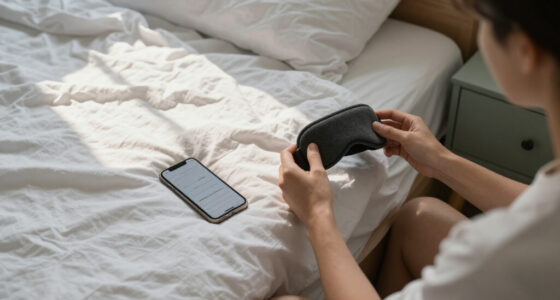
Place the mask over your eyes with the sensors in the positions shown in its instructions. Adjust the strap until the mask stays in place when you turn your head, without squeezing your eyes, temples, or nose. Check that the fabric blocks light as intended and that sensors touch the areas they are designed to contact. Lie down in your usual sleeping position for a few minutes and make small adjustments.
Tip: A very tight strap can be uncomfortable and may shift sensor contact. If the mask has an adjustable sensor module, follow its placement diagram rather than guessing.
Check: You can blink, breathe, and turn your head comfortably; the mask stays put and the app or device reports acceptable sensor contact, if that feature is available.
Step 6: Start a session and go to bed
Start tracking in the app or activate automatic tracking as described by the maker. Confirm that the session is recording or that automatic detection is enabled. Put the phone where it can remain connected if the device requires a nearby phone; otherwise, follow the mask’s offline recording instructions. Wear the mask through your normal sleep period.
Tip: Avoid starting a manual session long before bed if your app counts that time as sleep. If the mask becomes uncomfortable or causes irritation, remove it and note the interruption in the app if possible.
Check: The app or mask shows an active session, ready-to-track status, or another model-specific confirmation before you settle in.
Step 7: End the session and review the recording
In the morning, stop the session if your model does not stop automatically. Keep the mask near the phone while it syncs, and wait for the app to show that processing is complete. Open the night’s summary and check the recording duration, detected wake periods, and any sensor or connection warnings. Compare the timing with when you went to bed and woke up.
Tip: Look for patterns across several nights rather than treating one score or estimated sleep-stage chart as a precise measurement. Record unusual circumstances, such as travel, illness, alcohol, or a late bedtime, if the app supports notes.
Check: The app shows a dated overnight session with a duration close to your actual sleep period and no unresolved sync warning.
Step 8: Clean and store the mask
Remove the sensor module if the instructions say to do so. Clean the fabric and skin-contact areas using the approved method, then let them dry completely before reconnecting or charging the electronics. Store the mask and cable in a dry place where the sensors will not be crushed.
Tip: Do not immerse, machine-wash, or use cleaning products on electronic parts unless the maker specifically allows it.
Check: The mask is clean, fully dry, and stored with its sensors and charging port protected.
Common Mistakes to Avoid
- Wearing the mask too loosely or too tightly. — Adjust it while lying down in your usual position. Aim for steady sensor contact without pressure or discomfort.
- Assuming pairing means tracking has started. — Before bed, check for an active-session or automatic-tracking confirmation in the app or device.
- Reading a single sleep score as a medical result. — Use the data as a rough personal trend and seek clinical advice for ongoing symptoms or health concerns.
- Washing the whole mask or charging it while damp. — Follow the care instructions for your exact model, remove electronics as directed, and dry all washable parts fully.
Troubleshooting
Problem: The app cannot find or pair with the mask.
Solution: Charge and turn on the mask, keep it close to the phone, and confirm Bluetooth is enabled. Close and reopen the app, then follow the maker’s pairing steps. Remove an old pairing only if the instructions recommend it.
Problem: The session is missing or much shorter than expected.
Solution: Check whether tracking needed to be started manually, whether the phone had to stay nearby, and whether the mask ran out of charge. Review the app’s connection and sleep-detection settings before the next night.
Problem: The app reports poor sensor contact or gaps in the data.
Solution: Reposition the mask using its placement diagram and adjust the strap so the sensors remain against the intended areas. Clean and dry contact surfaces as directed. Check for a loose or damaged module.
Problem: The mask slips, feels painful, or irritates the skin.
Solution: Remove it, inspect the fit and contact surfaces, and adjust the strap or sensor placement before another session. Stop using it if discomfort or irritation continues; contact the maker or a healthcare professional as appropriate.
What Success Looks Like
You have a comfortable mask fit, a correctly paired and charged device, and a dated overnight recording in the app that roughly matches when you slept. The session has no unresolved device or sync alerts. For useful comparisons, repeat the setup consistently over several nights and interpret the results as estimates rather than diagnoses.
Next Steps
Wear the mask for several nights under your usual routine before drawing conclusions from trends. Note changes in bedtime, wake time, comfort, and any relevant disruptions so you can interpret the charts. Clean the mask as directed after use and charge it before the next session. If the tracking feature affects your sleep or you have ongoing symptoms such as persistent insomnia, loud snoring, or marked daytime sleepiness, stop relying on app scores for answers and discuss the symptoms with a healthcare professional.
Frequently Asked Questions
Can a sleep tracking mask diagnose sleep apnea or insomnia?
No. Consumer masks provide estimates based on their sensors and algorithms. They do not replace a clinical assessment or a sleep study. Ask a healthcare professional about persistent symptoms or suspected sleep disorders.
Do I need to keep my phone beside me all night?
It depends on the mask. Some models record data internally and sync in the morning; others need a nearby phone or a connection. Check the model’s instructions and test the required setup before bed.
Why does the mask say I was awake when I remember sleeping?
Movement and sensor signals can be misread, and brief awakenings may not be remembered. Treat the chart as an estimate, check for fit or connection issues, and compare several nights rather than relying on one result.
Can I wear the mask if I sleep on my side?
Check the maker’s guidance for side sleeping and sensor placement. Try lying on your side during the fit check; if the mask presses painfully, shifts, or loses contact, adjust it or stop using it.
Cold & flu season Picks

Blueair 2-in-1 Pro DH5i Air Purifier and Humidifier
As an affiliate, we earn on qualifying purchases.